 |
It's that time of year again where NZIB collect your Affiliation Fees and membership data.
Affiliation FeesAs agreed at the 2024 AGM, the Affiliation Fee for 2026 is: $25 per adult member $2 per secondary/junior member This fee is fixed for 3 years and is based on your 2024 membership numbers. An invoice will be issued by the end of the week with payment due by 25 July 2025.
Membership ReturnThe Membership Return process continues to evolve. You will recall that in 2025 we manually collected membership data from our clubs that was used to populate your Districts Sporty database (knowns as the Online Registration at the District level and Super CRM for NZIB). During the data collection process, we all experienced some resistance from our members regarding data sharing and privacy concerns. This resulted in much of the 2025 Online Registration being poorly populated (and subsequently impacted Sporty’s ability to automate the event entry processes). The aim of the 2026 Membership Return is to increase our data quality and completeness. With your help we hope to achieve this by every District completing the following steps (click the links for more ‘How to’ information:
And ideally:
3. Adding new members or those missed in 2025. 4. Archive old/deceased members. 5. Updating Club and District Roles. It is our hope that this will be the last time the Districts will need to be so involved with the Membership Return process as once we move into the new season this process should automate.
Membership Return & Sporty Roll-OverMany of you have asked about moving your Indoor Bowls Registration (2025) to 2026. We know that some of you have already done this but many are yet to do so. Please be advised that all Districts are required to roll over to the Indoor Bowls Registration (2026) by the end of this October 2026. The roll over process essentially transfers your members from one season to the next. In this case, from the 2025 season (when our member data was first imported into Sporty) to the current 2026 season. Yes, we have been operating a year behind while we’ve all been getting used to Sporty but if we all follow this process, we’ll all align for the 2027 season. While the concept of moving our members from one season to another sounds simple enough it’s important that the data we’re rolling over is complete and accurate first, hence the Membership Return guidance above. If we can spend a little time getting names and personal email addresses populated it’ll save considerable time and effort in the future.
NZIB recommend the following steps to roll-over:
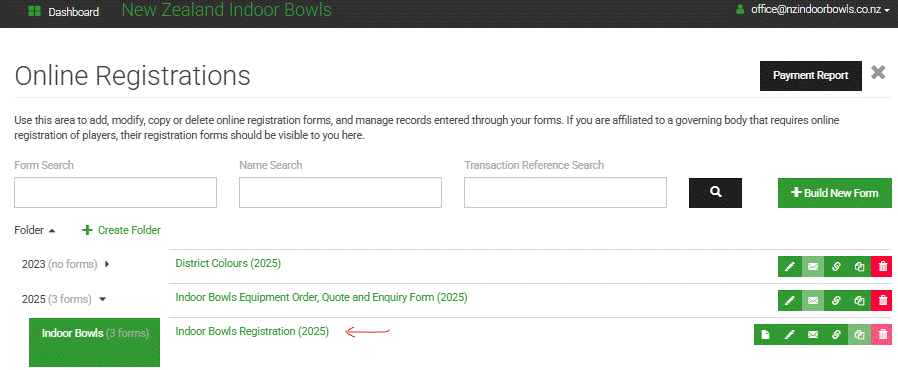
IMPORTANT – ensure that every member has an email address populated. If no personal email address is available then use the Club email address. No fake/holding email addresses please. WHY? – When it comes to rolling over to the new season Sporty will send an email to the member asking that they click a link to review/update their details and to agree to the terms and conditions. If no personal email address the Club will receive the email and will be tasked with reviewing/updating details and agreeing to the terms and conditions on behalf of the member. NO COMPUTER – If your club has no email address and no one technically savvy enough for this task then you will need to use the District email address and liaise with the club and/or members directly. 2. Initiate the roll-over process by navigating to your current Indoor Bowls Registration season form under the Online Registration module.  |
 |
 |
3. Invite your members to re-register by clicking the email icon on the current season form. 4. Customise the email message and then click Send email in the bottom right corner. Following is an example email that could be sent: “Hello, you are receiving this email from (DISTRICT NAME). In partnership with New Zealand Indoor Bowls, we have moved to an online membership management platform called Sporty. We now invite you to review and update your personal details by clicking this link. We encourage you to add your personal email address and date of birth if these currently show generic information. We will repeat this process again around March 2027 as we seek your re-registration for the new 2027 season. The storage and security of your personal information is important to us and we act in accordance with the NZIB and District Constitutions that are bound by the Privacy Act, the Incorporated Societies Act and others. Information on the Sporty securrity protocols can be accessed here. If you have any questions please contact your Club Secretary.”
When members click on the link in the email, it will open the Indoor Bowls Registration (2026) form pre-populated with their details. All they need to do is update any details and click Submit. They will then be registered in the new season. If you then view the previous seasons database you will see their name highlighted in green. This means they have re-registered. You can invite your members back to re-register more than once i.e. reminder email. This will only send the email invitation to those people who have not already re-registered. Registrants that do not want to re-register have an option to "unsubscribe" at the bottom of the email. An email notification will be sent to your inbox.
|
 |
Want Your Clubs to do More?
Sporty can now extend their Online Registration (database/CRM) and website offering direct to our clubs, with your permission. This means that your clubs could manage this entire process themselves in the future! If you're interested in finding out more please contact office@nzindoorbowls.co.nz
|
 |
Questions & Answers
How do New Members (or members that we missed last year) Register? New member registration can occur at any time via a link to your Online Registration Form. This link can be added to your free Sporty website, Facebook, introduction emails from the Club etc.
How do I invite an individual person to re-register? If there is a specific person you would like to invite back to re-register you can do this without inviting the entire database. To do this, click on the name of the Indoor Bowls Registration form to display a list of all people registered. Find the persons name and then click the envelope icon beside their name. This opens up the dialogue box so you can personalise the message and click Confirm to send.
What if a member refuses to share their email address or date of birth? We recommend that you add the Club Secretary email address as the member’s email address. This will ensure that any correspondence you/we send will be received and it will place the onus on the Club to ensure it is passed on. Furthermore, the onus will sit with the club to ensure the members information is correct.
I can’t correct a members Date of Birth As this is a key validation field in Sporty (to check for duplicate members etc) only NZIB can edit a Date of Birth. Please email office@nzindoorbowls.co.nz with any updates required.
How Do We Submit Our Return You no longer need to ‘submit’ a membership return. We have already received some spreadsheets with membership updates from some Districts. While we’re grateful to see that you’ve been proactive in this matter, we ask that you update your Online Registration Form in Sporty yourselves please. NZIB will take a snapshot of the Online Registration for each District as it presents in the SuperCRM at 5pm on 31 August 2026. This snapshot will be considered the 2026 Membership Return.
|
 |